
Search these docs, or ask Revo a question — answers link the pages they came from.
AlteCap Swift CELL
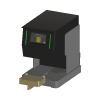 AltemisLab AlteCap Swift CELL Full-rack screw-cap decapper for SBS tube racks.
The AltemisLab AlteCap Swift is a benchtop decapper that takes the screw caps off a full rack of tubes, and puts them back, in one cycle. AltemisLab states it decaps a full rack of tubes in less than 20 seconds, that individual motors apply the same torque to every cap, and that models are available for 24, 48 and 96 SBS-format racks. The drivers that engage the caps sit in interchangeable cap driver cassettes, which AltemisLab states are compatible with screw caps from different manufacturers, so changing tube type is a cassette change. Caps can also be discarded to a waste vessel, and a drip tray sits under the rack during cap removal.
The Swift CELL is the integration model of that instrument. AltemisLab describes it as including an extended tray and an automatic door for access by a robotic arm, remote-control capability, and an optical detection grid used to detect errors. AltemisLab also sells a Swift CELL EYE variant that adds camera-based verification of each decap and recap step.
Revolution drives the Swift CELL over its RS-232 serial protocol. A schedule can decap a rack, recap it, put the caps into a cap carrier or discard them, pick caps back up from a carrier, loosen caps, move the rack stage in and out, and read the instrument’s state. Each cap-handling step holds until the decapper reports the result, and a failure is reported with the decapper’s own detail.
At a glance
Section titled “At a glance”| Type | Benchtop full-rack screw-cap decapper/recapper, integration model |
| Rack formats | 24, 48 and 96 SBS format, by model, per AltemisLab |
| Decap speed | A full rack in less than 20 seconds, per AltemisLab |
| Integration features | Extended tray, automatic door, remote control, optical detection grid, per AltemisLab |
| Connection | RS-232, 9-pole null-modem cable — 9600 baud, 8 data bits, no parity, 1 stop bit, no handshake |
| Plate locations | One — the stage the rack sits on |
| Revolution control | Decap, recap, loosen, store, waste and pick caps; stage in and out; sleep, wake, auto-sleep; drip tray on/off; read status; re-initialise |
AltemisLab publishes no specification sheet for the Swift CELL — neither its product page nor its Swift CELL EYE information sheet gives dimensions, torque, power or environmental figures — so this page states no specifications beyond the manufacturer statements quoted above. The serial settings in the table are those of AltemisLab’s manual as the driver applies them. The driver does not record which rack format the instrument is built for; the CELL and CELL EYE variants are driven the same way.
Supported methods
Section titled “Supported methods”The cap-handling cycle
Section titled “The cap-handling cycle”A decap leaves the caps held on the cap driver pins. They stay there until they are screwed back onto a rack, put into a cap carrier, or discarded, and the decapper refuses any command that does not fit that state — it will not decap while caps are on the pins, nor recap while none are. A schedule drives one rack through the decapper in this order:
- Move stage to load position — the stage comes out so a mover can place the rack.
- The mover places the rack on the stage.
- Move stage to cap position — the stage goes back into the decapper.
- Decap — the caps come off and stay on the pins. The decapper now reports
STATUS_RECAP. - Move stage to load position, and the mover takes the open rack away for whatever needs the tubes uncapped, then brings it back and places it again, followed by Move stage to cap position. The caps stay on the pins throughout.
- Recap — the caps on the pins are screwed back onto the rack. The decapper is ready for the next rack.
- Move stage to load position, and the mover picks the capped rack.
At step 6 there are two alternatives to Recap:
- Store caps — put the caps into an empty cap carrier on the stage, to be used again. Pick caps from carrier later takes them from a carrier on the stage back onto the pins, ready to Recap a rack of uncapped tubes. Picking fails if caps are already on the pins.
- Waste caps — discard the caps.
Loosen caps is the other cap operation: it turns the caps on the rack loose but leaves them engaged in the tube thread, so nothing is held on the pins afterwards.
The decapper cannot decap a second rack until the first rack’s caps have been recapped, stored or wasted, so a schedule that decaps several racks must clear the pins between them.
Power, drip tray and state
Section titled “Power, drip tray and state”- Sleep — put the decapper into power-save mode. The decapper refuses while caps are on the pins
- Wake — wake it from power-save mode. Nothing is sent if it is already awake
- Set auto-sleep — set how long the decapper may sit idle before it goes to sleep: 0 (off), 30 or 60 minutes. Any other value fails the step before anything is sent
- Set drip tray — turn the drip tray, and its laser check for tubes left hanging from the cap drivers, on or off. With it on, a tube left hanging stops the machine with an error
- Read status — read the decapper’s state and firmware information — version, profile, tube ID and cycle counter — and publish them
- Reinitialise — re-initialise the decapper, moving it back to its starting position. Run it after an operator has cleared a fault
Decap, Recap, Store caps, Waste caps, Pick caps from carrier and Loosen caps each check the decapper’s state before sending anything. A sleeping decapper is woken first. A decapper that is halted or in error, ejecting its cassette, or waiting for drip tray cleaning is refused without anything being sent, and the step fails asking for an operator and then Reinitialise.
What the steps publish. The cap-handling steps and Reinitialise publish the decapper’s state
afterwards as the schedule parameter SwiftCellStatus — for example STATUS_OK with no caps on the
pins, or STATUS_RECAP with caps held. The cap-handling steps also publish
SwiftCellErrorPosition and SwiftCellErrorImageId, empty unless the step failed. Read status
publishes SwiftCellStatus, SwiftCellInformation and SwiftCellCapabilities, the feature list the
firmware reported at initialise.
How failures are reported. If the decapper refuses a command — it is busy, the caps are in the wrong place, or it is asleep — nothing was done and the step fails saying so. If it accepts a cap cycle and then reports a failure, such as a decap error or a rack height it does not accept, the driver asks the decapper for the detail of the last error, where the firmware supports it: whether the source was the camera or mechanical, the tube position for a positional camera error, and the camera frame. The position and frame are published, the detail goes into the step’s error, and the step fails asking for the rack and cap drivers to be checked, the fault cleared and Reinitialise run.
There is no abort. The protocol has no abort command, so a cycle that has started always runs to its end. If a cap cycle reports no result within the Operation Timeout, the step fails warning that the machine may still be moving, and it must be checked before continuing.
Stage moves. The decapper only acknowledges a stage move, so after Move stage to load position or Move stage to cap position the driver reads the state every half second until the decapper is no longer busy. The step fails if the move ends with the decapper halted or in error, or if it is still busy after 30 seconds.
What the driver does not do
Section titled “What the driver does not do”- It does not move the stage when a mover picks or places. Placing or picking a rack with the stage in is the schedule’s responsibility: every stage move is an explicit step.
- It offers no step to enable or disable the safety door, nor for the recovery moves the firmware accepts while in error. Those are left to an operator at the instrument.
- It offers no step for ejecting, loading or switching the cap driver cassette, or for drip tray cleaning. A cassette change is done by an operator, and Revolution cannot check that the fitted cassette matches the tubes and caps in the rack.
- It does not lock the location during a cycle. Revolution will let a mover pick the rack while the decapper is working, so the schedule must not route a pick before the cycle’s step has finished.
Integration
Section titled “Integration”Revolution talks to the decapper directly over RS-232 — no vendor software sits in between. The driver follows AltemisLab’s Decapper Command Reference v1.6, for firmware 7032 and later. Each command is a short text code. The decapper frames every reply between STX and ETX bytes, and answers a cap cycle in steps: it says whether the operation has started or been refused, which must come within 5 seconds, and then reports the result, which must come within the Operation Timeout.
AltemisLab’s documents say only that replies are framed, not whether commands sent to the decapper must be. The driver frames its commands too, by default; Frame Commands With STX/ETX switches that off if the instrument ignores framed commands during commissioning.
Initialising the device opens the port, reads the decapper’s state and logs it. It moves nothing. A sleeping decapper is woken. If caps are already on the pins, or the decapper is halted or in error, a warning is logged but initialisation still succeeds, so that the caps can be dealt with or Reinitialise run from a schedule step. The driver then reads the firmware’s feature list and information for the log; firmware older than 7032 does not report a feature list, which does not fail initialisation, but it also gives no error detail when a cycle fails. Uninitialising closes the port.
The device presents one location, the stage.
In simulation, no instrument is contacted. Each step waits for its simulated duration and publishes
the state the decapper would report — STATUS_RECAP after Decap and Pick caps from carrier,
STATUS_OK after the other cap steps and Reinitialise — and Read status publishes
placeholder information. These are not instrument output, and the simulation does not track whether
caps are on the pins.
Prerequisites
Section titled “Prerequisites”- The decapper must be connected to the Revolution host with a 9-pole RS-232 null-modem cable, and its COM port known, before the device is initialised.
- The fitted cap driver cassette must match the tubes and caps in the racks the schedule sends.
- A schedule must clear the pins — Recap, Store caps or Waste caps — before it decaps another rack, and must move the stage to the load position before any place or pick.
- A cap carrier used by Store caps must be empty, and one used by Pick caps from carrier must hold caps, and either must be on the stage before the step.
Device configuration
Section titled “Device configuration”| Property | Purpose |
|---|---|
| COM Port Settings | The serial port the decapper is on, with its line settings. Defaults to COM1 at 9600 baud, 8 data bits, no parity, one stop bit, no flow control. |
| Operation Timeout (s) | Longest wait for a decap, recap, store, waste, pick, loosen or re-initialise to report its result. Defaults to 120 seconds; must be at least 1. |
| Frame Commands With STX/ETX | Wrap each command sent to the decapper in STX / ETX bytes, as its replies are. On by default. |
If you need more of this instrument driven from a schedule, get in touch — the driver is extended on demand.
Operations
These are available from a Run Device Operation step.
Decap
Removes the caps from the rack of tubes on the stage and holds the step open until the decapper reports the result. The caps stay on the cap driver pins until they are recapped, stored or wasted, and the step fails if caps are already on the pins or the rack height is not accepted.
Loosen Caps
Loosens the caps on the rack of tubes on the stage, leaving them engaged in the tube thread, and holds the step open until the decapper reports the result.
Move Stage To Cap Position
Moves the stage into the decapper, to the capping position, and waits until the decapper is no longer busy.
Move Stage To Load Position
Moves the stage out to the load position, so a robot can place or pick the rack, and waits until the decapper is no longer busy.
Pick Caps From Carrier
Picks caps up from the cap carrier on the stage onto the cap driver pins, ready to recap a rack of uncapped tubes. The step fails if caps are already on the pins.
Raise Error
Makes this device report a failure on demand: the step fails with an error naming the device, and the operator is offered the usual error recovery choices. No command reaches the instrument and nothing moves, and the failure is raised in simulation as well as on a real system, so this is the step to use when rehearsing how a schedule handles a device failure.
Read Status
Reads the decapper's current state and its firmware information: version, profile, tube ID and cycle counter.
Recap
Screws the caps held on the cap driver pins back onto the rack of tubes on the stage and holds the step open until the decapper reports the result. The step fails if no caps are on the pins.
Reinitialise
Re-initialises the decapper, moving it back to its starting position. Run it after an operator has cleared a fault.
Set Auto Sleep
Sets how long the decapper may stay idle before it enters power-save mode, or turns auto-sleep off.
| Parameter | Type | Default | Description |
|---|---|---|---|
| Auto-sleep (minutes) | int | 0 | Idle time before the decapper enters power-save mode: 0 (off), 30 or 60 minutes. No other values are accepted. The decapper does not go to sleep while it holds caps on its pins, and a decap or recap step wakes it first. |
Set Drip Tray
Turns the drip tray, and its laser check for tubes left hanging from the cap drivers, on or off.
| Parameter | Type | Default | Description |
|---|---|---|---|
| Enabled | bool | true | Turns the drip tray and its hanging-tube check on or off. With the drip tray on, a tube left hanging from a cap driver stops the machine with an error. |
Sleep
Puts the decapper into power-save mode. It refuses while caps are held on the pins.
Store Caps
Puts the caps held on the cap driver pins into the empty cap carrier on the stage and holds the step open until the decapper reports the result.
Wake
Wakes the decapper from power-save mode. Nothing is sent if it is already awake.
Waste Caps
Discards the caps held on the cap driver pins and holds the step open until the decapper reports the result.